Ordering

Ordering a Product

To order a product through the remote API, you need to know the ID of the product you want to order. Every product that is configured on the coffee machine has an identifier that uniquely identifies that specific product. These identifiers are visible in a backup of the “Products”. Thus restoring these Products on a different machine will give you the same unique identifiers for the same products. Similarly adding and deleting products on a coffee machine will change the known identifiers on the machine. Changing parameter values of a product will however not change their identifiers.

The API offers a function to get a list of all configured products with their names as shown in the user interface together with this ID. The ID is required in subsequent API functions to refer to a product.

Various conditions on the coffee machine can prevent it from pouring some or all of the configured products. For example, when the milk container is empty, none of the milk products can be poured. To know which products can be poured at the moment, the API provides requests and events which inform about the currently available products.

@startuml

participant "Remote Controller" as remote
participant "Coffee Machine" as cm

remote -> cm: Request GetProductList
cm -> remote: Response ProductList(map<string, string>)
note right
This response will contain a mapping of product
names as shown on the coffee machine screen to
the IDs used in the remote API.
end note

remote -> cm: Request GetAvailableProductIds
cm -> remote: Response AvailableProductIds(string[])
note right
The response will contain a list of product ids
for products which can currently be poured. An
empty list indicates that no product can currently
be poured.
end note

remote -> cm: Request StartProduct(string)
cm -> remote: Response ProductStarted(response_code)
note right
In case the product could be started, it will
return a response code ""SUCCESS""".
In case of a failure the product is not poured
and a corresponding error code is returned.
This could be ""PRODUCT_NOT_AVAILABLE""
when you attempted to start a product that
is currently unavailable.
end note

... product is poured ...

cm -> remote: Event ProductFinished(string, bool)
note right
Once the product has finished pouring, a
""ProductFinished" event is sent. It contains
the id of the product that has finished and a
boolean flag that indicates whether the product
could be poured successfully.
In case of a failure during pouring, you will
get additional events of the type ""ErrorEvent""
which will give you the details of the failure.
end note

@enduml

Order processing

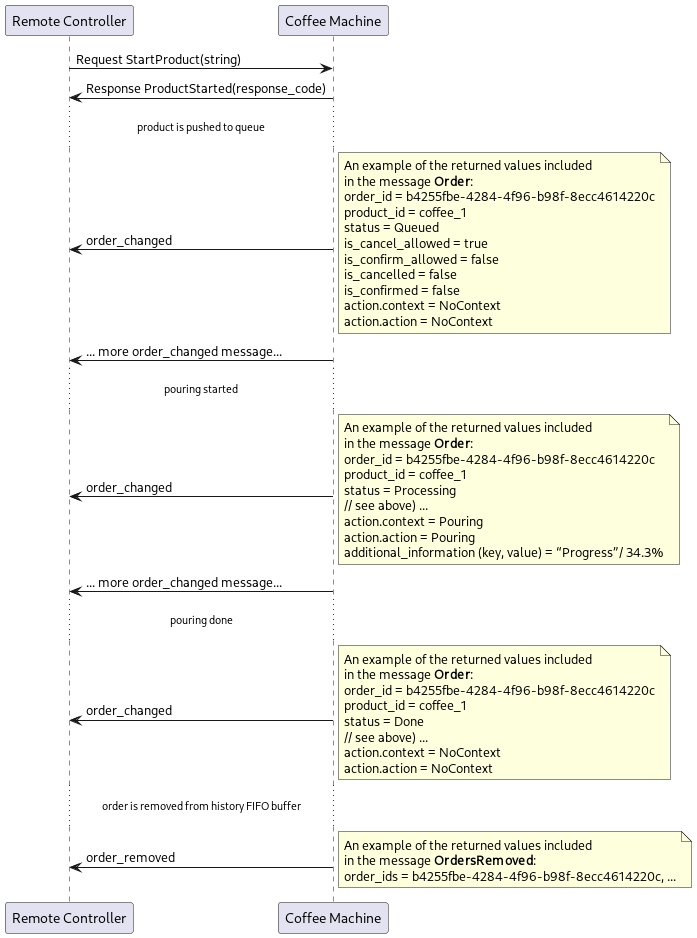
After a product has been ordered at the coffee machine, the status of the order is reported each time the data changes. The order_changed message returns the Order data set. Cleaning and rinsing are also considered products.

This data set contains a unique identifier for the order and an identifier for the associated product. As long as an Order exists on the machine, the status can be queried using the identifier. When the machine cleans up one or more outdated orders, an orders_removed message is sent. This message contains a list of the identifiers of the removed orders.
@startuml

participant "Remote Controller" as remote
participant "Coffee Machine" as cm


remote -> cm: Request StartProduct(string)
cm -> remote: Response ProductStarted(response_code)

... product is pushed to queue ...

cm -> remote : order_changed
note right
An example of the returned values included
in the message **Order**:
order_id = b4255fbe-4284-4f96-b98f-8ecc4614220c
product_id = coffee_1
status = Queued
is_cancel_allowed = true
is_confirm_allowed = false
is_cancelled = false
is_confirmed = false
action.context = NoContext
action.action = NoContext
end note

cm -> remote :... more order_changed message...

... pouring started ...

cm -> remote : order_changed
note right
An example of the returned values included
in the message **Order**:
order_id = b4255fbe-4284-4f96-b98f-8ecc4614220c
product_id = coffee_1
status = Processing
// see above) ...
action.context = Pouring
action.action = Pouring
additional_information (key, value) = “Progress”/ 34.3%
end note

cm -> remote :... more order_changed message...

... pouring done ...

cm -> remote : order_changed
note right
An example of the returned values included
in the message **Order**:
order_id = b4255fbe-4284-4f96-b98f-8ecc4614220c
product_id = coffee_1
status = Done
// see above) ...
action.context = NoContext
action.action = NoContext
end note

... order is removed from history FIFO buffer ...

cm -> remote : order_removed
note right
An example of the returned values included
in the message **OrdersRemoved**:
order_ids = b4255fbe-4284-4f96-b98f-8ecc4614220c, ...
end note


@enduml

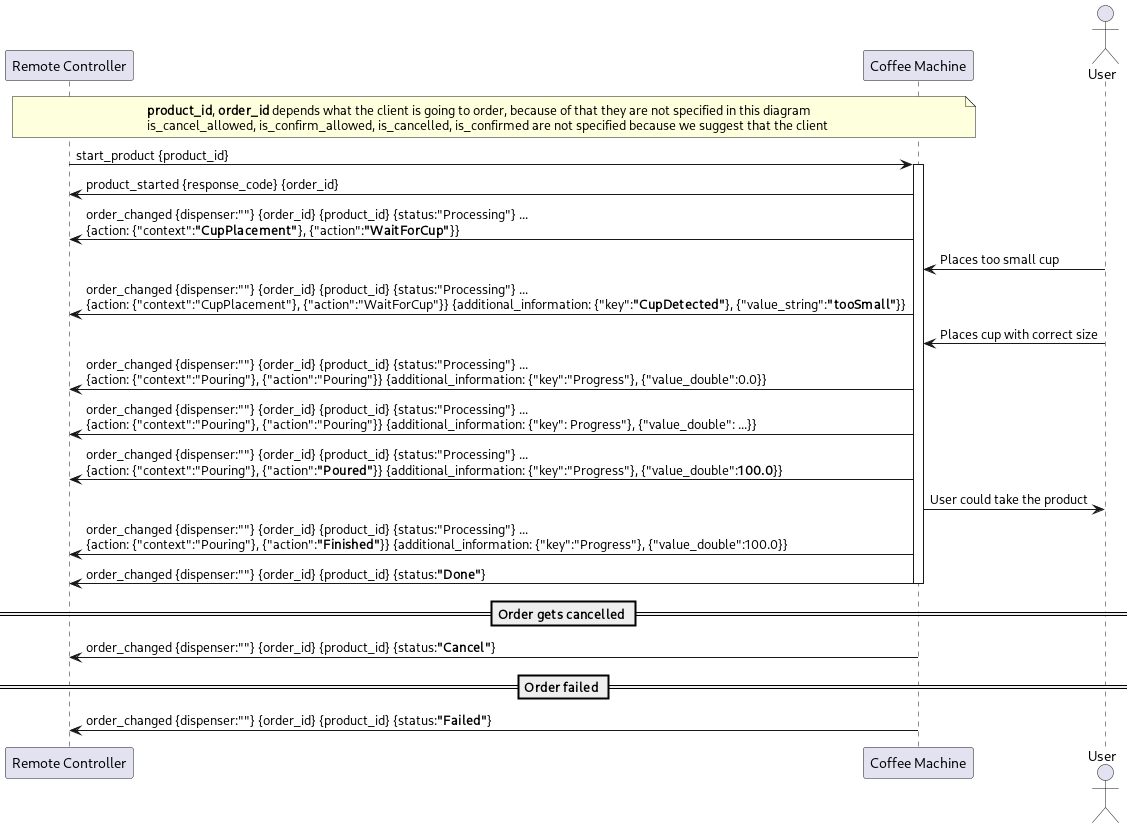
Cup placement handling - cup not placed

Note

This scenario is only applicable if the machine has a cup sensor and the sensor is activated.

If there is no cup placed below the outlet, the product cannot be poured. A CupPlacementAction::WaitForCup is sent to inform about the missing cup.

Additional information is provided if the sensor detects a cup that is too small.
@startuml

participant "Remote Controller" as remote
participant "Coffee Machine" as cm
actor User

note over remote, cm
**product_id**, **order_id** depends what the client is going to order, because of that they are not specified in this diagram
is_cancel_allowed, is_confirm_allowed, is_cancelled, is_confirmed are not specified because we suggest that the client 
end note

remote -> cm: start_product {product_id}
activate cm
cm -> remote: product_started {response_code} {order_id}
cm -> remote : order_changed {dispenser:""} {order_id} {product_id} {status:"Processing"} ... \n{action: {"context":**"CupPlacement"**}, {"action":**"WaitForCup"**}}

User -> cm: Places too small cup

cm -> remote : order_changed {dispenser:""} {order_id} {product_id} {status:"Processing"} ... \n{action: {"context":"CupPlacement"}, {"action":"WaitForCup"}} {additional_information: {"key":**"CupDetected"**}, {"value_string":**"tooSmall"**}} 

User -> cm: Places cup with correct size

cm -> remote : order_changed {dispenser:""} {order_id} {product_id} {status:"Processing"} ... \n{action: {"context":"Pouring"}, {"action":"Pouring"}} {additional_information: {"key":"Progress"}, {"value_double":0.0}} 

cm -> remote : order_changed {dispenser:""} {order_id} {product_id} {status:"Processing"} ... \n{action: {"context":"Pouring"}, {"action":"Pouring"}} {additional_information: {"key": Progress"}, {"value_double": ...}}

cm -> remote : order_changed {dispenser:""} {order_id} {product_id} {status:"Processing"} ... \n{action: {"context":"Pouring"}, {"action":**"Poured"**}} {additional_information: {"key":"Progress"}, {"value_double":**100.0**}}

cm -> User: User could take the product

cm -> remote : order_changed {dispenser:""} {order_id} {product_id} {status:"Processing"} ... \n{action: {"context":"Pouring"}, {"action":**"Finished"**}} {additional_information: {"key":"Progress"}, {"value_double":100.0}}

cm -> remote : order_changed {dispenser:""} {order_id} {product_id} {status:**"Done"**}
deactivate cm

== Order gets cancelled ==

cm -> remote : order_changed {dispenser:""} {order_id} {product_id} {status:**"Cancel"**}

== Order failed ==

cm -> remote : order_changed {dispenser:""} {order_id} {product_id} {status:**"Failed"**}

@enduml

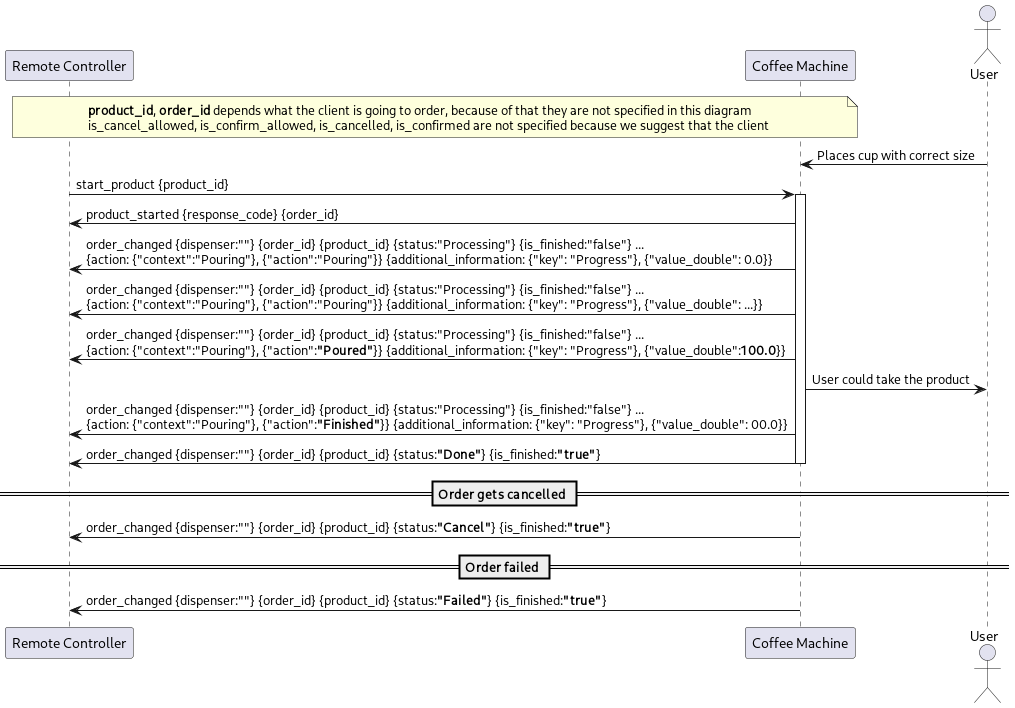
Cup placement handling - cup already placed

Note

This scenario is only applicable if the machine has a cup sensor and the sensor is activated.

If a cup of the required size is already placed below the outlet, no CupPlacementAction is sent. Instead, the product dispensing starts immediately.
@startuml

participant "Remote Controller" as remote
participant "Coffee Machine" as cm
actor User

note over remote, cm
**product_id**, **order_id** depends what the client is going to order, because of that they are not specified in this diagram
is_cancel_allowed, is_confirm_allowed, is_cancelled, is_confirmed are not specified because we suggest that the client 
end note

User -> cm: Places cup with correct size

remote -> cm: start_product {product_id}
activate cm
cm -> remote: product_started {response_code} {order_id}

cm -> remote : order_changed {dispenser:""} {order_id} {product_id} {status:"Processing"} {is_finished:"false"} ... \n{action: {"context":"Pouring"}, {"action":"Pouring"}} {additional_information: {"key": "Progress"}, {"value_double": 0.0}} 

cm -> remote : order_changed {dispenser:""} {order_id} {product_id} {status:"Processing"} {is_finished:"false"} ... \n{action: {"context":"Pouring"}, {"action":"Pouring"}} {additional_information: {"key": "Progress"}, {"value_double": ...}}

cm -> remote : order_changed {dispenser:""} {order_id} {product_id} {status:"Processing"} {is_finished:"false"} ... \n{action: {"context":"Pouring"}, {"action":**"Poured"**}} {additional_information: {"key": "Progress"}, {"value_double":**100.0**}}

cm -> User: User could take the product

cm -> remote : order_changed {dispenser:""} {order_id} {product_id} {status:"Processing"} {is_finished:"false"} ... \n{action: {"context":"Pouring"}, {"action":**"Finished"**}} {additional_information: {"key": "Progress"}, {"value_double": 00.0}}

cm -> remote : order_changed {dispenser:""} {order_id} {product_id} {status:**"Done"**} {is_finished:**"true"**}
deactivate cm

== Order gets cancelled ==

cm -> remote : order_changed {dispenser:""} {order_id} {product_id} {status:**"Cancel"**} {is_finished:**"true"**}

== Order failed ==

cm -> remote : order_changed {dispenser:""} {order_id} {product_id} {status:**"Failed"**} {is_finished:**"true"**}

@enduml