Introduction
The Device to Device Remote API (D2D RAPI) provides mechanisms to control and monitor a BW4 or BW4c coffee machine. For the customer there is the possibility to integrate the coffee machine into his own system of different devices (see figure below).

System Examples
Currently there are the following examples of how the API can be used in the field to integrate the coffee machine into the customer’s system environment:
Use Case 1
In the first example, the customer operates a Convenience Store. To order the coffee, the customer has a screen at the entrance of the store. After the customer has completed his order and paid, he receives a QR code. The payment and the generation of the QR code all happens with the interface box. The QR code can now be scanned in at the QR code reader next to the coffee machine. This tells the Interface Box that the product can be produced. The Interface Box informs the KM that it can release product XY.

Use Case 2
The customer interacts via an external screen unit, which is equipped with a Single Board Computer (SBC). The coffee machine display is no longer needed for the actual interaction with the customer. Therefore, the product production is no longer displayed when an order is triggered via the D2D API. With the SBC, the coffee machine is controlled via RS232 connection and triggers the products selected by the customer on the external screen on the coffee machine. The payment system is also controlled by the SBC via MDB interface.Via the customers cloud connection, the desired range of recipes can be improved and expanded. In addition, machine and payment data can be analysed and corresponding measures for service or product adjustments can be taken.

Use Case 3
The customer interacts via an external screen which can be used to trigger the desired product. The external screen unit is equipped with an SBC, which sends a command to the connected robotic system. This system is responsible for the placement of the product at the coffee machine and its later delivery to the customer. In parallel, the SBC interacts with the coffee machine and triggers the desired product and tracks the status of the coffee machine during its production.

Communication Basics
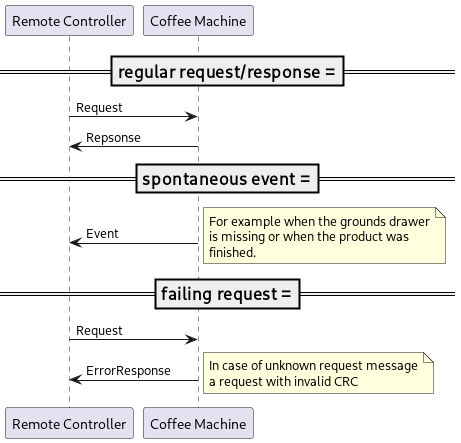
All communication between an external client and the coffee machine is based on
Requests sent from the client to the coffee machine
Responses sent by the coffee machine as reaction to corresponding requests
Events sent by the coffee machine to inform the client about certain conditions
The general message flows are depicted in the following diagram