Physical Layer
The communication is based on an RS232 connection with these default settings:
115200 baud
8 data bits
1 stop bit
Parity None
No flow control
The baud rate is configurable when starting the client. If not configured the default value
of 115200 baud is used. To set a specific baud rate, use the -b argument.
Example of starting the serial client with 9600 baud:
/usr/bin/RapiSerialClient -c /dev/ttyS0 -b 9600
Note
A lower baud rate may not be sufficient for a flawless communication. Keep in mind when choosing a lower baud rate!
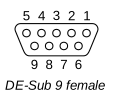
The connector provided on the coffee machine side is a DE-Sub 9 type connector as shown below:
Note
The pins 2, 3 and 5 are assigned the usual RxD, TxD and GND function of RS232 connections. However since this connector is also used for CCI/CSI devices, the pin 8 provides a 24V supply voltage (max. 1A) to the payment equipment and pin 9 (usually functioning as Ring Indicator (RI) line) is hardwired to pin 5 - Ground. This should be considered for example when plugging this connector into RS232 socket of a PC. In that case pin 8 should be cut from the cable or disconnected by some other means. All other pins are unused.