Application Layer Protobuf
Protobuf or Protocol Buffers work with *.proto files to generate code in various programming languages. The generated classes contain code to access the fields (setter & getter methods) of each message, as well as methods to serialize or parse messages from raw bytes.
For example an incomplete code snippet that should visualize field access:
ApiMessage message;
ApiMessage response;

message.ParseFromArray(packet.data(), packet.size() - LengthOfCRCInBytes)

// Getter method of sequence_id
auto sequenceId = message.sequence_id();

// Setter method of sequence_id
response.set_sequence_id(sequenceId);
Another example for handling incoming messages:
switch (message.api_message_case())
{
    case ApiMessage::kStartProduct:
        ...
    ...
    case ApiMessage::kActiveEvents:
        ...
}
Message Structure
Messages are built using the protobuf library following the proto-definition further down. Additionally a CRC16 is calculated over the serialized protobuf data and appended to that buffer in big endian byte order as follows:
Protobuf message |
2-bytes of CRC |
For CRC16 the polynomial 0xC86C is used with an initial value of 0xFFFF.
Example Packets
Three sample packets for the message ApiMessage, described in the remoteapi_rs232.proto file above, follow.
ApiMessage has three fields protocol_version, sequence_id and api_message.
api_message can be of any of the other described message types.
Some of those messages contain additional parameters and some are just the message ID itself.
Note
Be aware that the fields are optional (in proto 2 version there was also the required / optional specifier).
At the moment only one protocol version is supported (1) and therefore the field protocol_version is not contained in the examples below.
GetProductList Request
The GetProductList message has the value 0x1002 and no additional fields/parameters.
In the example the sequence_id is 1.
Protobuf serialized message:
10 |
01 |
92 |
80 |
02 |
00 |
The first two bytes 0x10 and 0x01 are used for the sequence ID.
These values can be visualized with an online decoder (e.g. https://protobuf-decoder.netlify.app/).
The decoder will visualize that field number 2 (which in our definition is the sequence_id) has the value 1.
The same request with sequence ID 2 would be:
10 |
02 |
92 |
80 |
02 |
00 |
The other four bytes (0x92 0x80 0x02 0x00) are decoded to the decimal value of 4098 which is the GetProductList request message 0x10 0x02.
CRC appended to the message (with sequence_id = 1):
10 |
01 |
92 |
80 |
02 |
00 |
81 |
34 |
Message escaped:
Replace
0x10with0x10 0x30Replace
0x02with0x10 0x22
10 |
30 |
01 |
92 |
80 |
10 |
22 |
00 |
81 |
34 |
Message with frame markers:
02 |
10 |
30 |
01 |
92 |
80 |
10 |
22 |
00 |
81 |
34 |
03 |
ProductList Response
sequence_id= 1
response_code=SUCCESS
product_list= { “Coffee”: “Coffee_1”, “Espresso”: “Espresso_1” }
Protobuf serialized message:
10 |
01 |
92 |
80 |
08 |
2e |
08 |
… |
70 |
72 |
65 |
73 |
73 |
6f |
5f |
31 |
CRC appended to the message:
10 |
01 |
92 |
80 |
08 |
2e |
08 |
… |
65 |
73 |
73 |
6f |
5f |
31 |
0c |
28 |
Message escaped:
10 |
30 |
01 |
92 |
80 |
08 |
2e |
… |
65 |
73 |
73 |
6f |
5f |
31 |
0c |
28 |
Message with frame markers:
02 |
10 |
30 |
01 |
92 |
80 |
08 |
… |
73 |
73 |
6f |
5f |
31 |
0c |
28 |
03 |
ProductStarted Response
sequence_id= 7
response_code=SYSTEM_BUSY= 100
Protobuf serialized message:
10 |
07 |
8a |
80 |
08 |
02 |
08 |
64 |
CRC appended to the message:
10 |
07 |
8a |
80 |
08 |
02 |
08 |
64 |
9e |
38 |
Message escaped:
10 |
30 |
07 |
8a |
80 |
08 |
10 |
22 |
08 |
64 |
9e |
38 |
Message with frame markers:
02 |
10 |
30 |
07 |
8a |
80 |
08 |
10 |
22 |
08 |
64 |
9e |
38 |
03 |
Communication Scenarios
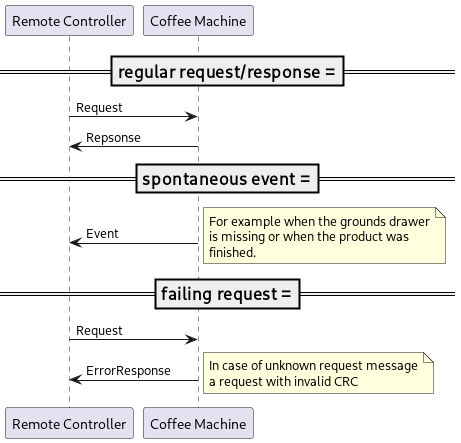
CRC Calculation
#include "rapi_crc.h"

namespace RapiSerialClient
{
constexpr uint16_t Polynom = 0xC86C;

uint16_t crc16(const QByteArray &message)
{
    uint16_t crc = 0xffff;

    for (const auto &byte : message)
    {
        crc = crc ^ (byte << 8);
        for (int j = 0; j < 8; ++j)
        {
            if (crc & 0x8000)
            {
                crc = (crc << 1) ^ Polynom;
            }
            else
            {
                crc = (crc << 1);
            }
        }
    }

    return crc;
}

bool crc16_verify(const QByteArray &message_with_crc)
{
    return (crc16(message_with_crc) == 0x0);
}

void append_crc16(QByteArray &message)
{
    uint16_t crc = crc16(message);
    message.append((crc >> 8) & 0xff);
    message.append(crc & 0xff);
}

}  // namespace RapiSerialClient